Opening a case
Opening a case takes you into the case workspace. The workspace shows the current step and the panels you can use while the case is open.
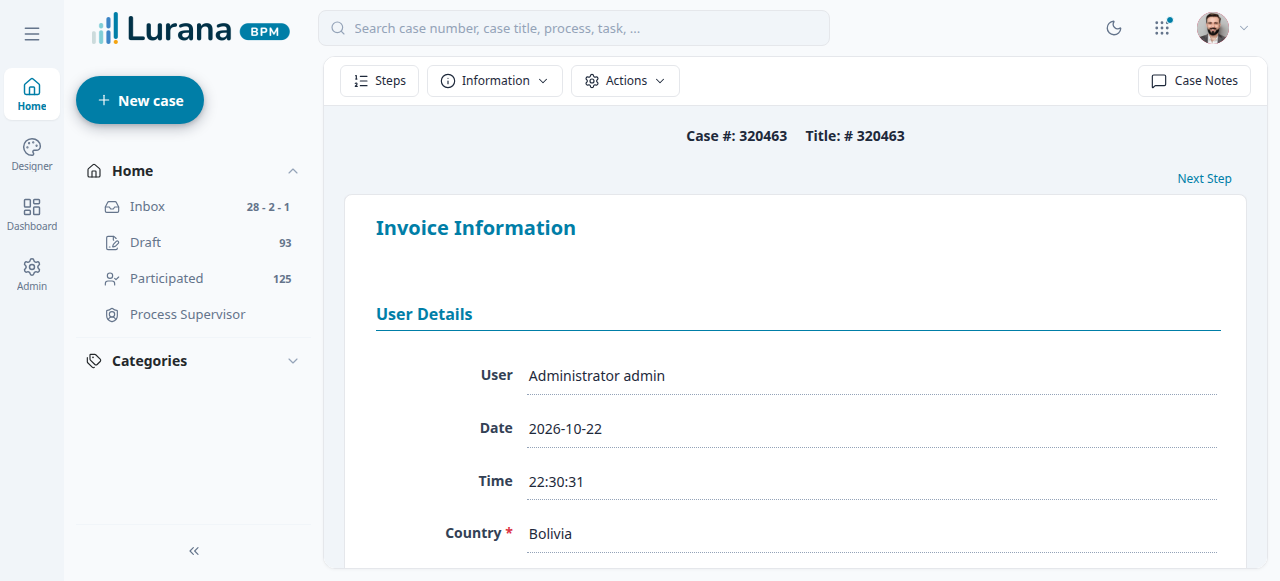
Open a case from a list
- Open Inbox, Draft, Participated, or Process Supervisor.
- Find the case by number, title, process, or task.
- Select the case and choose Open.
If the case is unassigned, you may need to claim it first. See Case actions.
Complete a step
- Read the current step and fill in the required fields.
- Use the step controls to continue to the next step or return to the previous one.
- Some steps open a legacy page inside the workspace. Use that page's own controls to complete the step.
- When the step is complete, continue until the case reaches its next task or ends.
The next task, routing option, and assignee are chosen in Derivation when the process requires it.
Case state
If a case is paused, cancelled, or completed, the step controls may be disabled. Check Case information and Case actions.
Related
- Case information — verify the case and task.
- Documents — attach or review documents for the step.
- Forms — work with Dynaforms.